Questions about Proposals and Binding
The Below information is for Agents only
Can I edit the proposal?
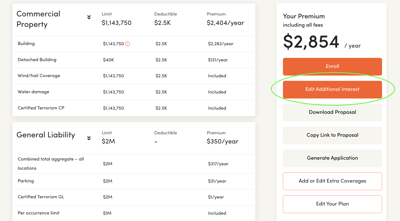
Yes! You can edit coverages directly from the Proposal page.
How long is my proposal valid?
Proposals are valid 30 days or until the effective date, whichever comes first. After that they expire automatically.
What should I do when my proposal is expired?
In case the proposal has expired but still within 90 days from submission date, then you can go back to the quote, edit the effective date and then copy the expired proposal with the new effective date. Otherwise, please write to us directly at service@honeycombinsurance.com. Please remember to provide the proposal number you wish to reopen
Can I bind a proposal with a retroactive effective date?
Our system will not allow you to bind with retroactive effective date. If you wish to reopen your file please write to us directly at service@honeycombinsurance.com. Please provide the proposal number you wish to reopen (e.g. BQ1111-20210203) and the desired effective date.
Can I amend the address in a proposal?
Once submitted, the address can not be edited from the dashboard. If any adjustments need to be made prior to binding you can contact us directly at service@honeycombinsurance.com
How can I issue a policy?
Here's a short manual showing how to bind an online proposal.
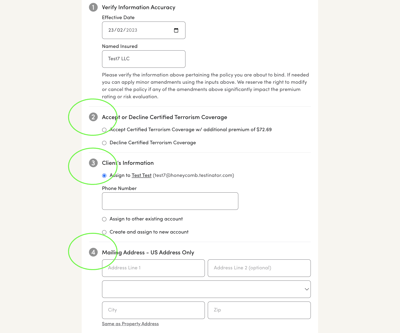
1. Verify if the Effective Date and Named Insured are correct.
2. Select to "Accept" or "Decline" the Certified Terrorism Coverage.
3. Input insured's contact information. There are 3 options available:
- Assign to the contact on the file
- Assign to another existing client
- Assign to a new account
➡️ After that the policy is bound and our system will show you the payment page where you can choose a payment plan and add a payment method. If you don't have such information you will be able to generate a payment link which you may send to the insured.
We have the following payment plans are available:
- 2-Pay Payment Plan: 50% down and 1 payment after 6 months
- 4-Pay Payment Plan: 30% down and 3 equal payments 75 days apart
- 9-Pay Payment Plan: 30% down and 8 equal monthly payments 30 days apart
Please be advised that invoices with payment plans are being set on automatic payments by default.
❗ Installment fees:
- Billing link with payment portal (they may forward this link any trusted party)
- Self-Inspection link (they may also forward this link)
- Documents for electronic signature